Important:
- An Administrator in the main account can switch between the main account and its sub-accounts.
- Sub-account Administrators cannot switch between accounts.
- Administrator Officers have limited permissions compared to Administrators and cannot switch between accounts.
How to Switch between accounts
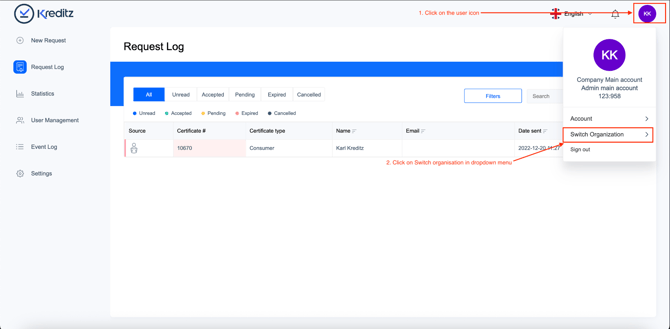
Step 1: Click the user icon located in the top-right corner of the screen.
Step 2: In the dropdown menu, select Switch Organization.
Step 3: Select the sub-account you want to access, then click Switch.
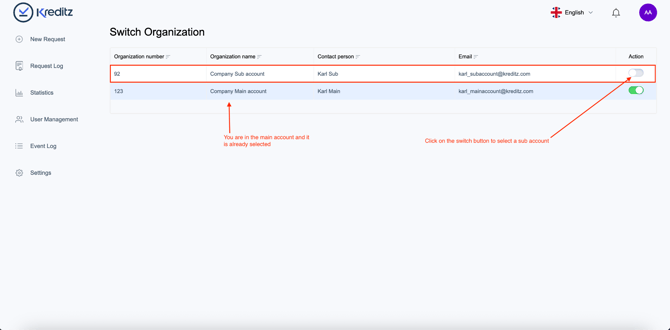
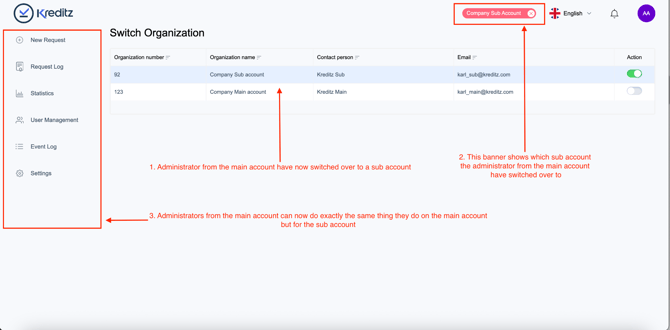
Step 4: You are now switched into the selected sub-account.
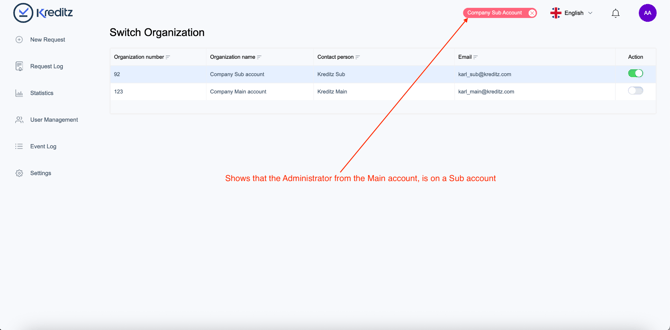
A red banner in the top bar will display the name of the sub-account you are currently viewing. As an Administrator from the main account, you can now perform all the same actions within this sub-account that you normally can in the main account.
Step 5: To return to the main account, you have two options:
-
Click the X icon on the right side of the red banner, or
-
Open the user dropdown menu, select Switch Organization, and choose the main account.
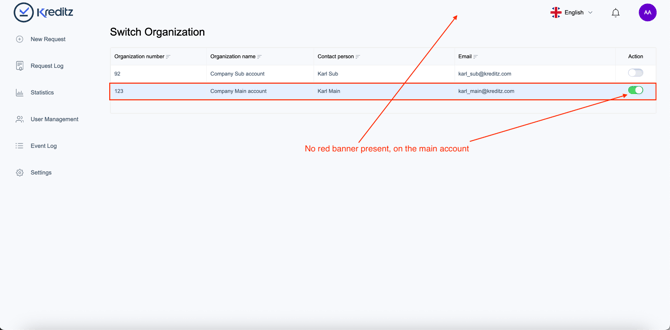
Once the red banner is no longer visible in the top bar, you have successfully returned to the main account.